
MarkDown语法学习

Markdown 标题语法
要创建标题,请在单词或短语前面添加井号 (#) 。# 的数量代表了标题的级别。例如,添加三个 # 表示创建一个三级标题 (<h3>) (例如:### My Header)。
Markdown 段落
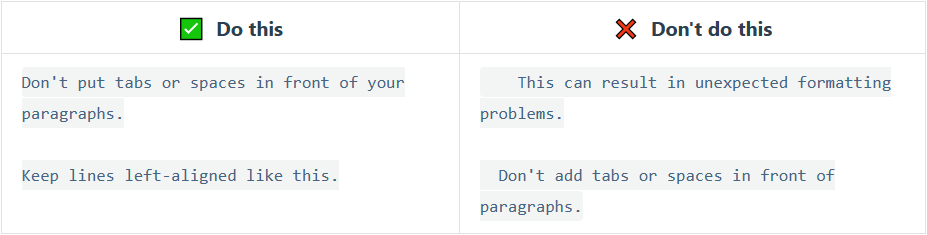
要创建段落,请使用空白行将一行或多行文本进行分隔。
不要用空格(spaces)或制表符( tabs)缩进段落。
Markdown 强调语法
粗体(Bold)
要加粗文本,请在单词或短语的前后各添加两个星号(asterisks)或下划线(underscores)。如需加粗一个单词或短语的中间部分用以表示强调的话,请在要加粗部分的两侧各添加两个星号(asterisks)。
| Markdown语法 | HTML | 预览效果 |
|---|---|---|
I just love **bold text**. | I just love <strong>bold text</strong>. | I just love bold text. |
I just love __bold text__. | I just love <strong>bold text</strong>. | I just love bold text. |
Love**is**bold | Love<strong>is</strong>bold | Loveisbold |
加粗了 这个也是
Markdown 应用程序在如何处理单词或短语中间的下划线上并不一致。为兼容考虑,在单词或短语中间部分加粗的话,请使用星号(asterisks)。
斜体(Italic)
要用斜体显示文本,请在单词或短语前后添加一个星号(asterisk)或下划线(underscore)。要斜体突出单词的中间部分,请在字母前后各添加一个星号,中间不要带空格。
| Markdown语法 | HTML | 预览效果 |
|---|---|---|
Italicized text is the *cat's meow*. | Italicized text is the <em>cat's meow</em>. | Italicized text is the cat’s meow. |
Italicized text is the _cat's meow_. | Italicized text is the <em>cat's meow</em>. | Italicized text is the cat’s meow. |
A*cat*meow | A<em>cat</em>meow | Acatmeow |
斜体 1
粗体(Bold)和斜体(Italic)
要同时用粗体和斜体突出显示文本,请在单词或短语的前后各添加三个星号或下划线。要加粗并用斜体显示单词或短语的中间部分,请在要突出显示的部分前后各添加三个星号,中间不要带空格。
| Markdown语法 | HTML | 预览效果 |
|---|---|---|
This text is ***really important***. | This text is <strong><em>really important</em></strong>. | This text is really important. |
This text is ___really important___. | This text is <strong><em>really important</em></strong>. | This text is really important. |
This text is __*really important*__. | This text is <strong><em>really important</em></strong>. | This text is really important. |
This text is **_really important_**. | This text is <strong><em>really important</em></strong>. | This text is really important. |
This is really***very***important text. | This is really<strong><em>very</em></strong>important text. | This is reallyveryimportant text. |
粗体和斜体
Markdown 引用语法
要创建块引用,请在段落前添加一个 > 符号。
1 | > Dorothy followed her through many of the beautiful rooms in her castle. |
渲染效果如下所示:
Dorothy followed her through many of the beautiful rooms in her castle.
引用
1
2
3
嵌套块引用
块引用可以嵌套。在要嵌套的段落前添加一个 >> 符号。
1 | > Dorothy followed her through many of the beautiful rooms in her castle. |
渲染效果如下:
Dorothy followed her through many of the beautiful rooms in her castle.
The Witch bade her clean the pots and kettles and sweep the floor and keep the fire fed with wood.
带有其它元素的块引用
块引用可以包含其他 Markdown 格式的元素。并非所有元素都可以使用,你需要进行实验以查看哪些元素有效。
1 | > #### The quarterly results look great! |
渲染效果如下:
The quarterly results look great!
- Revenue was off the chart.
- Profits were higher than ever.
Everything is going according to plan.
Markdown 列表语法
可以将多个条目组织成有序或无序列表。
有序列表
要创建有序列表,请在每个列表项前添加数字并紧跟一个英文句点。数字不必按数学顺序排列,但是列表应当以数字 1 起始。
| Markdown语法 | HTML | 预览效果 |
|---|---|---|
1. First item2. Second item3. Third item4. Fourth item | <ol><li>First item</li><li>Second item</li><li>Third item</li><li>Fourth item</li></ol> | 1. First itemSecond 2. itemThird 3. itemFourth item |
1. First item1. Second item1. Third item1. Fourth item | <ol><li>First item</li><li>Second item</li><li>Third item</li><li>Fourth item</li></ol> | First itemSecond itemThird itemFourth item |
1. First item8. Second item3. Third item5. Fourth item | <ol><li>First item</li><li>Second item</li><li>Third item</li><li>Fourth item</li></ol> | First itemSecond itemThird itemFourth item |
1. First item2. Second item3. Third item 1. Indented item 2. Indented item4. Fourth item | <ol><li>First item</li><li>Second item</li><li>Third item<ol><li>Indented item</li><li>Indented item</li></ol></li><li>Fourth item</li></ol> | First itemSecond itemThird itemIndented itemIndented itemFourth item |
- first
- second
- t
- sd
- sd
无序列表
要创建无序列表,请在每个列表项前面添加破折号 (-)、星号 (*) 或加号 (+) 。缩进一个或多个列表项可创建嵌套列表。
| Markdown语法 | HTML | 预览效果 |
|---|---|---|
- First item- Second item- Third item- Fourth item | <ul><li>First item</li><li>Second item</li><li>Third item</li><li>Fourth item</li></ul> | - First itemSecond itemThird itemFourth item |
* First item* Second item* Third item* Fourth item | <ul><li>First item</li><li>Second item</li><li>Third item</li><li>Fourth item</li></ul> | First itemSecond itemThird itemFourth item |
+ First item+ Second item+ Third item+ Fourth item | <ul><li>First item</li><li>Second item</li><li>Third item</li><li>Fourth item</li></ul> | First itemSecond itemThird itemFourth item |
- First item- Second item- Third item - Indented item - Indented item- Fourth item | <ul><li>First item</li><li>Second item</li><li>Third item<ul><li>Indented item</li><li>Indented item</li></ul></li><li>Fourth item</li></ul> | First itemSecond itemThird itemIndented itemIndented itemFourth item |
sd
ds
asd
sd
- sd
- sd
sd
Markdown 代码语法
要将单词或短语表示为代码,请将其包裹在反引号 (```) 中。
| Markdown语法 | HTML | 预览效果 |
|---|---|---|
`At the command prompt, type 'nano'.` | At the command prompt, type <code>nano</code>. | At the command prompt, type nano. |
转义反引号
如果你要表示为代码的单词或短语中包含一个或多个反引号,则可以通过将单词或短语包裹在双反引号(````)中。
| Markdown语法 | HTML | 预览效果 |
|---|---|---|
''Use `code` in your Markdown file.'' | <code>Usecodein your Markdown file.</code> | Use `code` in your Markdown file. |
1 | int main(){ |
Markdown 分隔线语法
要创建分隔线,请在单独一行上使用三个或多个星号 (***)、破折号 (---) 或下划线 (___) ,并且不能包含其他内容。
1 | *** |
以上三个分隔线的渲染效果看起来都一样
Markdown 链接语法
链接文本放在中括号内,链接地址放在后面的括号中,链接title可选。
超链接Markdown语法代码:[超链接显示名](超链接地址 "超链接title")
对应的HTML代码:<a href="超链接地址" title="超链接title">超链接显示名</a>
1 | 这是一个链接 [Markdown语法](https://markdown.com.cn)。 |
渲染效果如下:
这是一个链接 Markdown语法 。
给链接增加 Title
链接title是当鼠标悬停在链接上时会出现的文字,这个title是可选的,它放在圆括号中链接地址后面,跟链接地址之间以空格分隔。
1 | 这是一个链接 [Markdown语法](https://markdown.com.cn "最好的markdown教程")。 |
渲染效果如下:
这是一个链接 Markdown语法 。
网址和Email地址
使用尖括号可以很方便地把URL或者email地址变成可点击的链接。
1 | <https://markdown.com.cn> |
渲染效果如下:
https://markdown.com.cn
fake@example.com
带格式化的链接
强调 链接, 在链接语法前后增加星号。 要将链接表示为代码,请在方括号中添加反引号。
1 | I love supporting the **[EFF](https://eff.org)**. |
渲染效果如下:
I love supporting the EFF .
This is the Markdown Guide .
See the section on code.
Markdown 图片语法
链接图片
给图片增加链接,请将图像的Markdown 括在方括号中,然后将链接添加在圆括号中。
1 | [](https://markdown.com.cn) |
渲染效果如下:

Markdown 任务列表语法
任务列表使您可以创建带有复选框的项目列表。在支持任务列表的Markdown应用程序中,复选框将显示在内容旁边。要创建任务列表,请在任务列表项之前添加破折号-和方括号[ ],并在[ ]前面加上空格。要选择一个复选框,请在方括号[x]之间添加 x 。
1 | - [x] Write the press release |
- 1
- 2
- 标题: MarkDown语法学习
- 作者: SkyLeech
- 创建于 : 2024-04-06 19:59:14
- 更新于 : 2024-09-05 15:48:22
- 链接: https://blog.skyleech.me/2024/04/06/MarkDown语法学习/
- 版权声明: 本文章采用 CC BY-NC-SA 4.0 进行许可。